Build steps
The IDE provides you a possibility, to execute custom pre-build and post-build commands.
The pre-build commands run before the main build process. for example, you can use these commands to preprocess your source files before the build.
The post-build commands run after the main build process. For example, you can use them to post-process the generated output like in case of generating MCS C-array from the elf file.
There are two ways how to configure pre-build and post-build steps. The basic and the advanced configuration. The basic configuration you can find under the menu . It allows you to configure commands on a single line, so it is more suitable for simple commands.
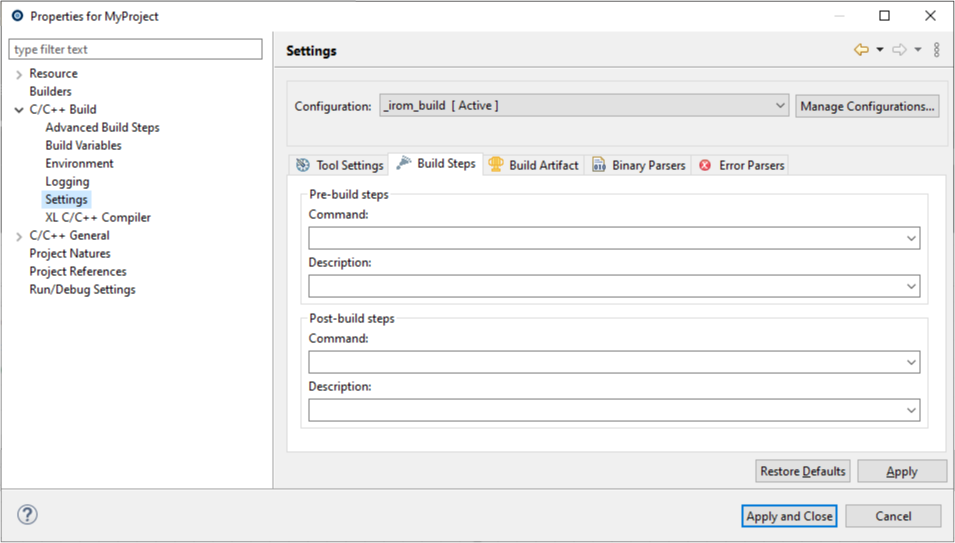
The advanced configuration allows you a definition of complex commands having each parameter on a separate line. You can also specify the order of command execution as well as to enable or disable them.
You can reach the Advanced Build Steps configuration form the menu
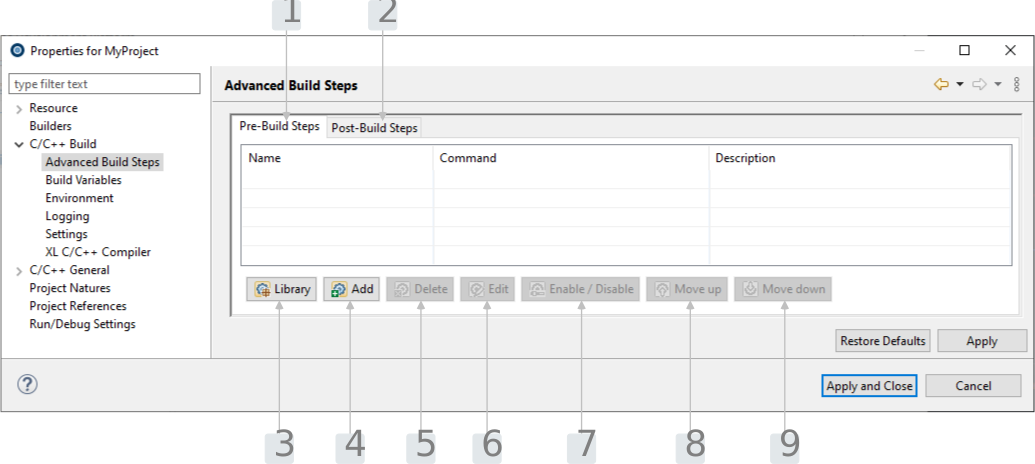
| Number | Description |
|---|---|
1 |
The list of pre-build commands. |
2 |
The list of post-build commands. |
3 |
Add build steps from the defined library. |
4 |
Add new build step. |
5 |
Remove selected build step. |
6 |
Edit selected build step. |
7 |
Enable / disable selected build step. |
8 |
Move selected build step up in the list. |
9 |
Move selected build step down in the list. |
The Advanced Build Steps configuration offers a pre-defined set of some frequently used commands for both pre-build and post-build steps.
PRE-BUILD
The pre-build library comes with these commands:
| Name | Description |
|---|---|
Print compiler version |
Prints the GCC compiler version into a log file. |
Print LLVM compiler version |
Prints the LLVM compiler version into a log file. |
POST-BUILD
The post-build library comes with these commands:
| Name | Description |
|---|---|
Generate C-Array |
The |
Strip |
The command line tool |
Create disassemble |
The tool |
Generate hex |
The tool |
Generate srec |
The tool |
Section headers |
The tool |
Size |
The size of all output sections (e.g., code section .text) can be extracted with this post build step. |
Click at the drop-down arrow of the Display Selected Console button at the Console view toolbar ( ) and choose the option
 Pre/Postbuild Console to see Pre/Post build commands output.
